
Your Apple Watch Quietly Got a Simple Yet Helpful Charging Feature

And no, you don’t have to have the newest Apple Watch to take advantage of it.

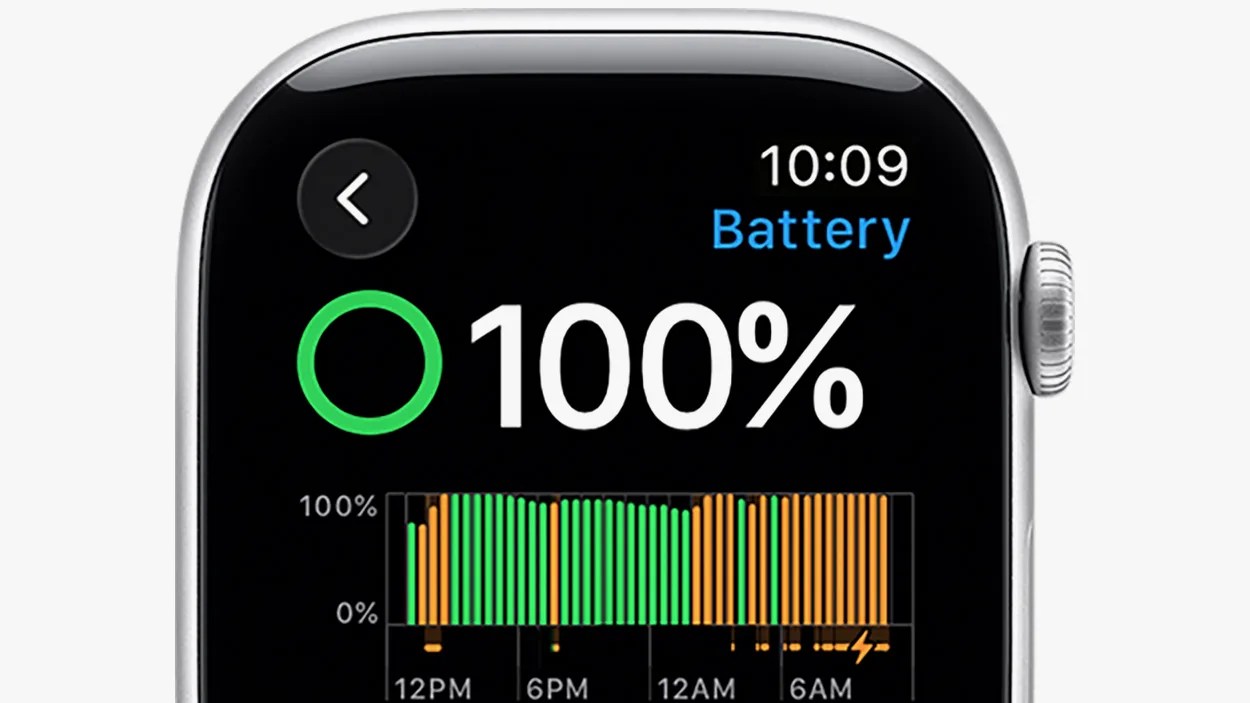
Smartwatch screen displaying a battery status of 100% with a green circular indicator. The time shown is 10:09. Below the percentage, there is a bar graph showing battery levels over time from 12 PM to 6 AM, with green and orange bars indicating different battery usage or charging periods.Apple

watchOS 26 has finally landed — as has the availability of all three new Apple Watch models, the Ultra 3, Series 11 and SE 3 — and with it, your current Apple Watch gained a bunch of new features.

(Note: watchOS 26 is supported by the Series 6 or later, SE 2 or later and all Ultra models.)

If you’re somebody who always worries about your Apple Watch’s battery life, watchOS 26 adds a few things that you might find helpful.

For example, when your Apple Watch is running low on battery, it’ll send a notification to your iPhone to tell you to charge. Then, when it’s charging and finally full, it’ll send your iPhone another notification telling you it’s ready to rock.

Additionally, Apple has added a new feature that lets you know if your Apple Watch could be charging faster.

A “Slow Charger” warning

Apple Watch screen showing battery status at 100%, with a circular green battery icon, a bar graph indicating battery levels over time, and a notification stating "Slow Charger now." The time displayed is 10:09.
The “Slow Charger” notification will appear in the Battery section of your Apple Watch.
Apple

Now that watchOS 26 is out, Apple has published a new support page that discusses Apple Watch charging speeds.

The most notable thing about this support page is that it highlights a new “Slow Charger” notification that will let you know if, when charging, your Apple Watch is paired with a slower charger. Below is how the support document explains it:

“With watchOS 26, if your Apple Watch detects that your charging experience could be improved, you’ll see a Slow Charger message in Settings > Battery. This doesn’t mean that there’s anything wrong with your Apple Watch or charger; it just means that your watch could charge faster by using a higher-wattage charger.”

A hand holding a smartwatch displaying the settings menu with options for SOS, Battery, and Privacy & Security. In the background, there is a blurred black smartphone lying on a wooden surface.
Any Apple Watch Series 6 (or later), SE 2 (or later) or any Ultra model supports watchOS 26.
Photo by Tucker Bowe for Gear Patrol

Accessing this feature is a bit of a hassle, admittedly, as you have to place your Apple Watch on the charging puck and then navigate to the Battery section on your Apple Watch — you can’t access this from the Watch app on your iPhone.

Once you get to the Battery section, a “Slow Charger” warning will appear in orange if you’re not charging at its fastest charging speed.

To charge your Apple Watch at its fastest charging speeds, Apple recommends using the charging cable that comes with it and pairing it with a USB-C adapter that supports Power Delivery (PD).

To learn more about this feature, check out Apple’s support page below.

Want to stay up to date on the latest product news and releases? Add Gear Patrol as a preferred source to ensure our independent journalism makes it to the top of your Google search results.

add as a preferred source on google
,