If your iPhone shuts off randomly and won’t fire back up — no matter how long you charge it or how long you hold down the power button — don’t worry, you’re not alone. This has actually happened to me recently with my iPhone 13 mini.
After a little confusion and frustration, I actually found out that Apple offers a solution to this. It just involves pressing and holding a combination of buttons (power and volume controls) in a specific order — and it hard restart your iPhone. And don’t worry, when it fires up, your iPhone won’t lose any of your apps or data.
How to Hard Restart Your iPhone
Apple
The process of hard restarting your iPhone is different depending on which model of iPhone you have. The newer models that do not have a Home button are a little more complicated.
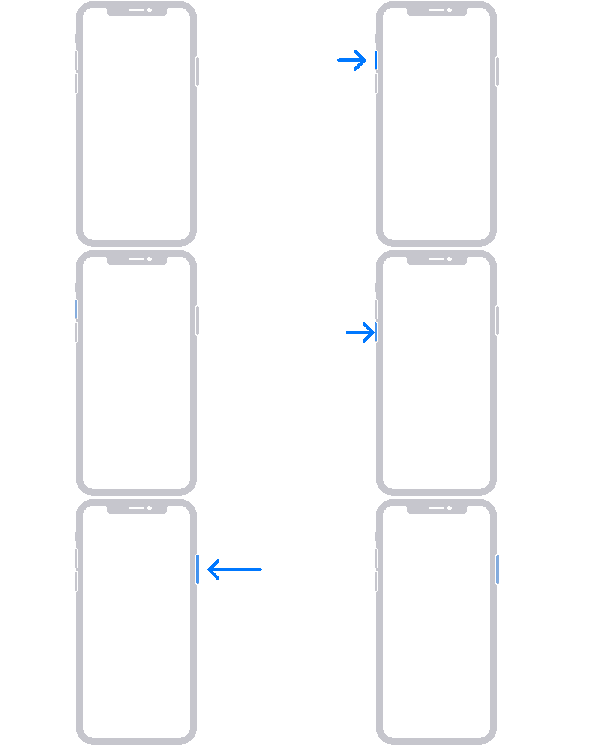
If you have an iPhone 8 or later:
Press and release the volume up button.
Press and release the volume down button.
Press and hold the side button. Continue doing so until you see the Apple logo. (It should take around five seconds.)
If you have an iPhone 7 or iPhone 7 Plus:
Press and hold both the side button and the volume down button until you see the Apple logo. (It should take around five seconds.)
If you have an iPhone 6s or earlier:
Press and hold both the Home button and the side button (or top button) until you see the Apple logo. (It should take around five seconds.)





 Apple
Apple